FEATURE AVAILABILITY STARTING FROM RELEASE 2.8.2
Introduction
The JS7 - REST Web Service API allows performing any sort of operation on the lifecycle of scheduling objects such as creating, deploying, running, stopping workflows and jobs.
The REST Web Service API is available from JOC Cockpit. Use of the REST Web Service API requires jobs to implement a REST Client for the functionality to login and to logout from JOC Cockpit and any other calls to the API.
In order to reduce the overhead of REST Client implementation, a Python class is suggested for simplified use of the JS7 REST Web Service by jobs using Oracle® GraalVM, see JS7 - GraalVM Python Jobs.
REST Client Python Class
A Python class is proposed that establishes a connection to JOC Cockpit and performs the login procedure required to access the JS7 REST Web Service API.
The Python class makes use of the Java ApiExecutor class that ships with JS7 Agents:
ApiExecutor = java.type("com.sos.js7.job.jocapi.ApiExecutor")
After authentication, the class provides a post(path, body) method that sends requests to the JS7 REST Web Service API.
Example of a Python class for access to the JS7 REST Web Service API
import java
ApiExecutor = java.type("com.sos.js7.job.jocapi.ApiExecutor")

class JS7RestApi:
    def __init__(self, js7Step):
        self.module_name = "Python-JS7RestApi"
        self.logger = js7Step.getLogger()
        self.api_executor = ApiExecutor(js7Step)
        self.access_token = None

        try:
            self.access_token = self.api_executor.login().getAccessToken()
        except Exception as e:
            self.close()
            raise e

    def __enter__(self):
        return self

    def __exit__(self, exc_type, exc_val, exc_tb):
        self.close()

    def close(self):
        if self.logger.isDebugEnabled():
            self.logger.debug(f"[{self.module_name}]close")

        if self.api_executor is not None:
            self.api_executor.closeQuietly(self.access_token)

        self.api_executor = None
        self.access_token = None

    def post(self, path, body):
        response = self.api_executor.post(self.access_token, path, body)
        if self.logger.isDebugEnabled():
            self.logger.debug(f"[{self.module_name}][{response.getStatusCode()}]{response.getResponseBody()}")

        return response
Explanation:
- The class automatically signs in to JOC Cockpit from its constructor: __init__().
- The JOC Cockpit URL, user account, password or certificate are used from the JS7 Agent's .
/config/private/private.conffile. - For details see JS7 - JITL Common Authentication
- The JOC Cockpit URL, user account, password or certificate are used from the JS7 Agent's .
- The class automatically signs off from JOC Cockpit by use of its destructor: __exit__().
- For use of the
js7Stepobject see JS7 - Job API.
Script Include
For reusability users can add the Python class to a JS7 - Script Include that can be used by any number of jobs. Changes to the Script Include will be reflected with the next deployment of the workflow.
The illustration shows the created Script Include resource:

Python Job
The illustration shows the created workflow resource:
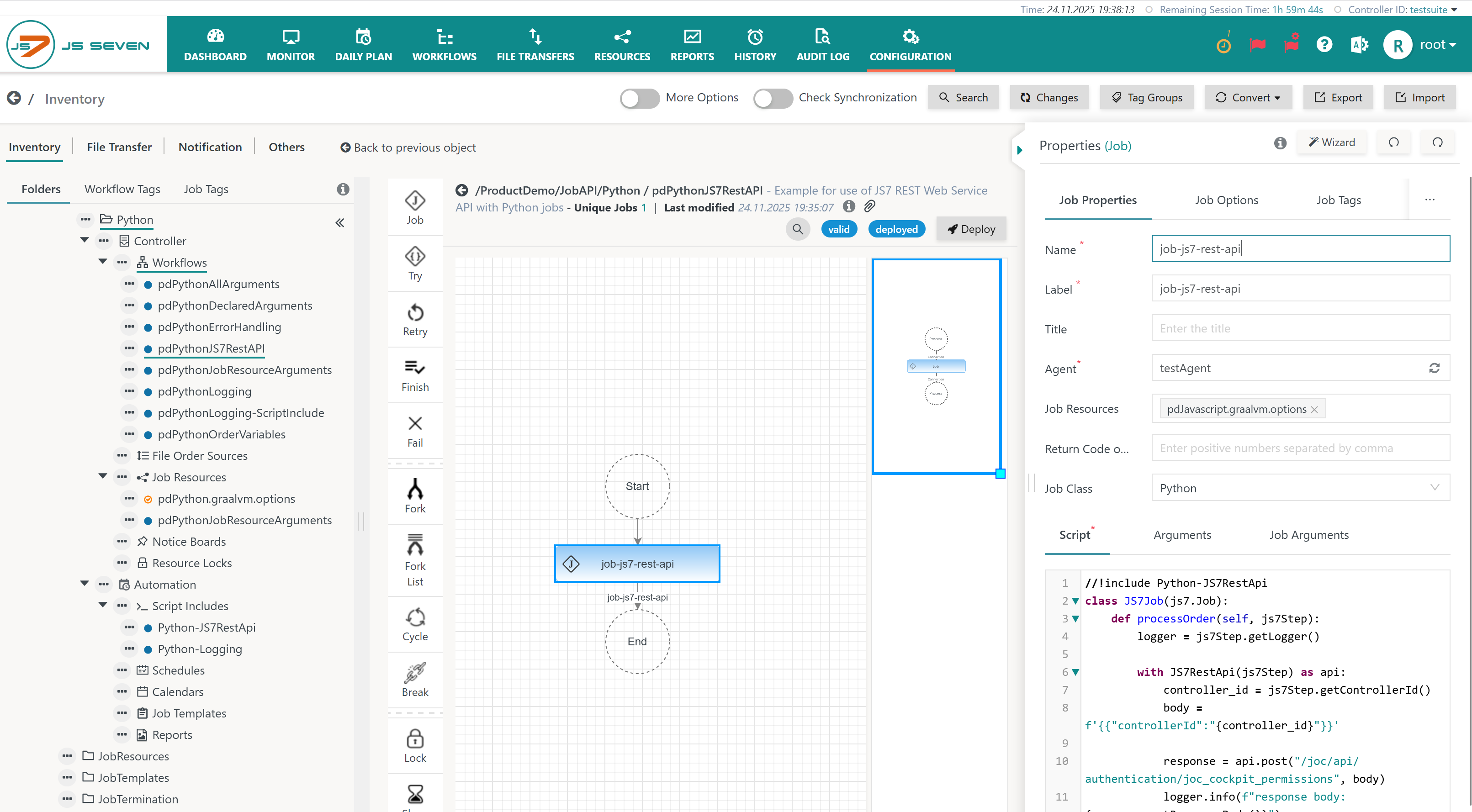
Explanation:
A Python job can make use of the REST Client Python class provided by the Script Include: ##!include Python-JS7RestApi
Example of job script using Python class to access the JS7 REST Web Service API
# Imports the json module.
import json

# Includes the Python-JS7RestApi script.
##!include Python-JS7RestApi

# Injects the Polyglot context into the JS7Job class and initializes the processOrder function for use in Python.
class JS7Job(js7.Job):
    def processOrder(self, js7Step):
	 	# Creates an instance of the JS7 logger.
        logger = js7Step.getLogger()

		# Uses Python's context manager to handle the lifecycle of the JS7RestApi class.
        with JS7RestApi(js7Step) as api:
			# Retrieves the controller ID and constructs the JSON request body.
            controller_id = js7Step.getControllerId()
            body = json.dumps({"controllerId": controller_id})

			# Executes a call to the JS7 REST Web Service that returns the current user's permissions in JOC Cockpit from the REST response.
            response = api.post("/joc/api/authentication/joc_cockpit_permissions", body)

			# Logs the response body and the HTTP status code.
            logger.info(f"response body: {response.getResponseBody()}")
            logger.info(f"response status code: {response.getStatusCode()}")
Resources
Downloads
- Download Python class from Script Include (upload .json): Python-JS7RestApi.includescript.json
- Download sample Python job from Workflow (upload .json): pdPythonJS7RestAPI.workflow.json
Links
- JS7 - Job API
- JS7 - GraalVM Python Jobs
- JS7 - How to handle warnings and errors in GraalVM Python Jobs
Overview
Content Tools