Introduction
The JOC Cockpit ships with a default Signing Certificate that is available from the root account's JS7 - Profiles - Signature Key Management page.
- Users are recommended to create Signing Certificates using their own Private CA or a Public CA. For details see JS7 - How to create X.509 Signing Certificates.
- Use of the default CA included with JOC Cockpit is not considered a secure practice:
- Any JS7 installation ships with the same default CA's Private Key and Certificate.
- Users are bound to expiration terms of the default CA's Signing Certificate.
The proceeding includes
- updating the Signing Certificate.
- redeploying Workflows & Job Resources and updating the Daily Plan.
Users who wish using the default Signing Certificate for a longer period can alternatively apply the related change:
- JS-2219 - Getting issue details... STATUS
- JS7 - How to apply the change for continued use of default Signing Certificate
Default Signing Certificates
The following default CA's Signing Certificates ship per JS7 release and are valid until the indicated expiration date:
| Starting from Release | Ending with Release | Certificate Subject | Certificate Expiration Date | Certificate File | Private Key File |
|---|---|---|---|---|---|
| 2.5.12, 2.7.6, 2.8.0 | - | 2.5.4.46=#1306534f53204341,CN=sos-ec,OU=IT,O=SOS,L=Berlin,ST=Berlin,C=DE | 2030-06-15 11:15:03 UTC | signature-certificate-valid-until-2030-06-15.pem | |
| 2.0.0 | 2.5.11, 2.7.5 | DNQ=SOS CA, CN=sos-ec, OU=IT, O=SOS, L=Berlin, ST=Berlin, C=DE | 2025-10-12 12:50:55 UTC |
If the Signing Certificate is not updated before expiration, then this will result in denial of running jobs and deploying workflows. Such errors are visible from the Agent's and Controller's log file like this:
Example for error raised in case that an expired Signing Certificate is used
2025-10-19T12:34:51,973 WARN js7.subagent.SubagentCommandExecutor - Workflow:My-Workflow~d6e268c0-bdfa-4f7a-8e14-1f739a00db54 could not be verified: java.security.cert.CertificateExpiredException: NotAfter: Sun Oct 12 07:50:55 CDT 202
Updating the Signing Certificate
Note: Users who do not use the default CA Signing Certificate that ships with JS7, should not follow the below proceeding but should update on expiration terms of their individual Signing Certificate.
- Users can update to a current release to receive a valid CA Signing Certificate.
- Users who operate a JS7 release that ships with a default CA Certificate and who do not wish to update to a current release, can apply the following procedure for manually updating the Signing Certificate.
Verifying the Signing Certificate's validity period
- From the JS7 - Dashboard view check the JOC Cockpit's rectangle to identify the Security Level in use. If a JOC Cockpit Cluster is used, verify for each JOC Cockpit instance.
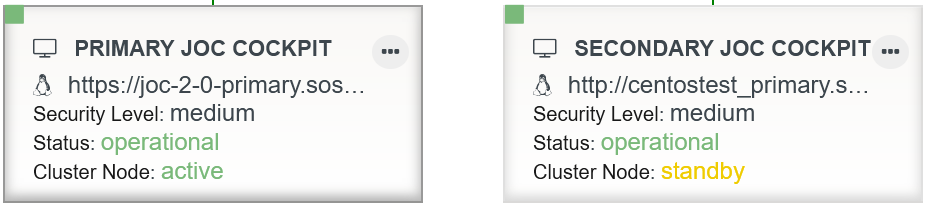
- For Security Level
low, login to JOC Cockpit using therootaccount and navigate to the JS7 - Profiles - Signature Key Management page. - For Security Level
medium, login to JOC Cockpit using the user account(s) entitled for deployment and navigate to the JS7 - Profiles - Signature Key Management page.
- For Security Level
- Check the Certificate Subject and Expiration Date if they match one of the Certificates indicated with chapter Default Signing Certificates.
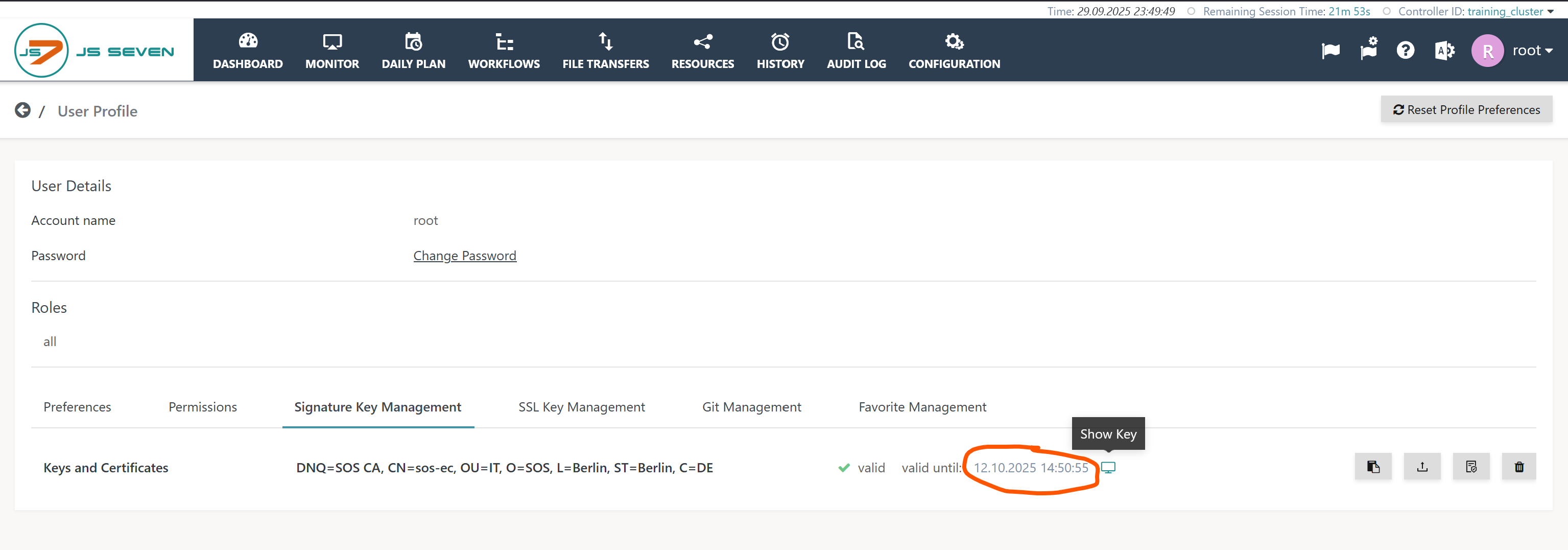
Replacing the Signing Certificate
- Use the
 (Update Public/Private Key) button to copy & paste a valid Signing Certificate: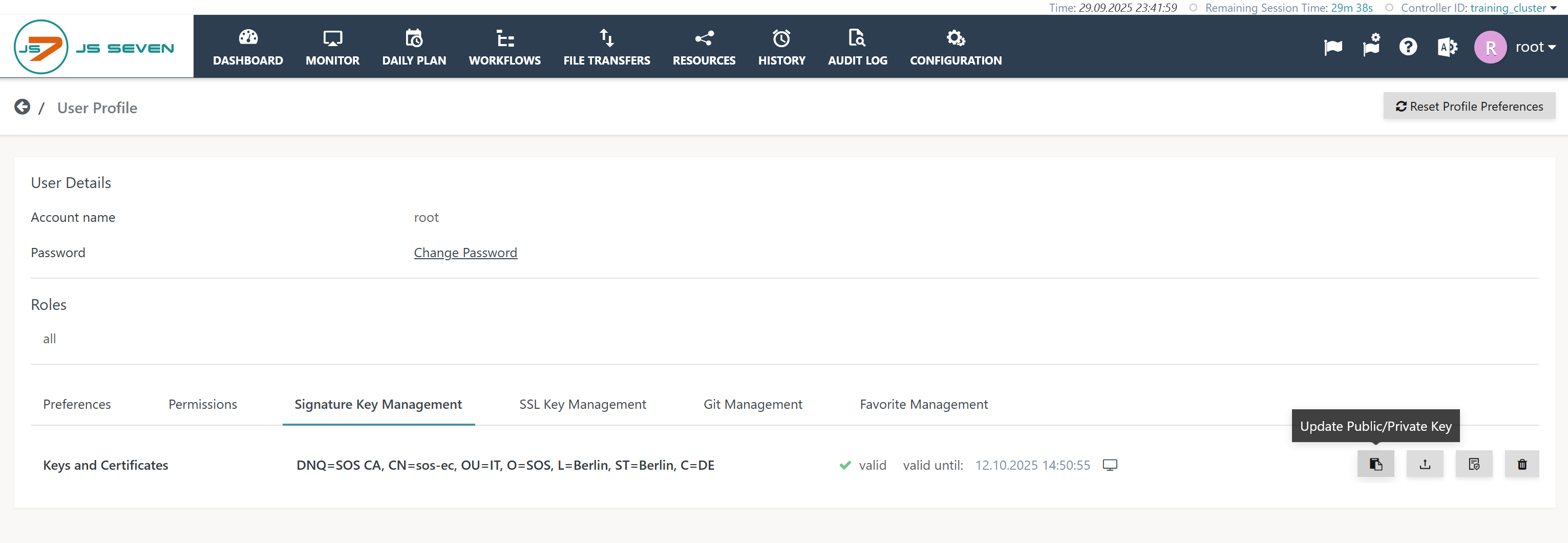
A pop-up window will be displayed that requires the following inputs:
- ECDSA: check the related radio button,
- Private Key: use the below Private Key offered for pasting.
- X.509 Certificate: use the below Signing Certificate offered for pasting.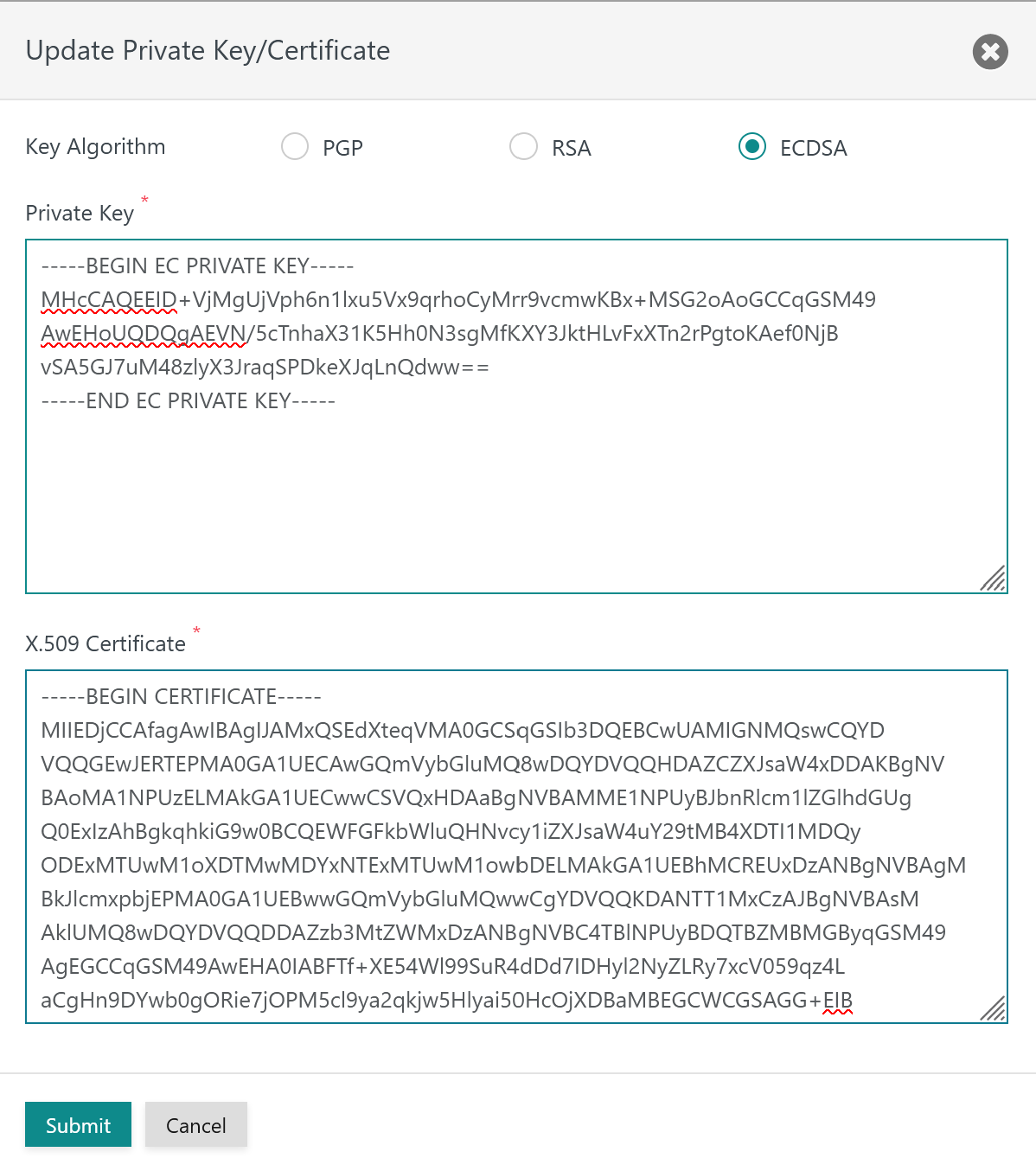
Copy & paste the following Private Key and Signing Certificate. The Private Key does not expire, the below Signing Certificate is valid for the period until 2030-06-15.
Private Key-----BEGIN EC PRIVATE KEY----- MHcCAQEEID+VjMgUjVph6n1lxu5Vx9qrhoCyMrr9vcmwKBx+MSG2oAoGCCqGSM49 AwEHoUQDQgAEVN/5cTnhaX31K5Hh0N3sgMfKXY3JktHLvFxXTn2rPgtoKAef0NjB vSA5GJ7uM48zlyX3JraqSPDkeXJqLnQdww== -----END EC PRIVATE KEY-----
Signing Certificate valid until 2030-06-15-----BEGIN CERTIFICATE----- MIIEDjCCAfagAwIBAgIJAMxQSEdXteqVMA0GCSqGSIb3DQEBCwUAMIGNMQswCQYD VQQGEwJERTEPMA0GA1UECAwGQmVybGluMQ8wDQYDVQQHDAZCZXJsaW4xDDAKBgNV BAoMA1NPUzELMAkGA1UECwwCSVQxHDAaBgNVBAMME1NPUyBJbnRlcm1lZGlhdGUg Q0ExIzAhBgkqhkiG9w0BCQEWFGFkbWluQHNvcy1iZXJsaW4uY29tMB4XDTI1MDQy ODExMTUwM1oXDTMwMDYxNTExMTUwM1owbDELMAkGA1UEBhMCREUxDzANBgNVBAgM BkJlcmxpbjEPMA0GA1UEBwwGQmVybGluMQwwCgYDVQQKDANTT1MxCzAJBgNVBAsM AklUMQ8wDQYDVQQDDAZzb3MtZWMxDzANBgNVBC4TBlNPUyBDQTBZMBMGByqGSM49 AgEGCCqGSM49AwEHA0IABFTf+XE54Wl99SuR4dDd7IDHyl2NyZLRy7xcV059qz4L aCgHn9DYwb0gORie7jOPM5cl9ya2qkjw5Hlyai50HcOjXDBaMBEGCWCGSAGG+EIB AQQEAwIEEDAOBgNVHQ8BAf8EBAMCBeAwFgYDVR0lAQH/BAwwCgYIKwYBBQUHAwMw HQYDVR0OBBYEFBORoUzmc2PORMqo/hYc58JFDVqHMA0GCSqGSIb3DQEBCwUAA4IC AQDBI2kcWoz3MjRi15dhHQBxFbLz5F+ObYuivT0Rp21K1HJGnGakDYqMLiBNZLbX 35pSd3bEA85amNwsrknoxo1qDUk5rl+d+uaflBj0aIrOHPAO8gJPT1s7foaP6gAM UitsAMKbba1oGg91LoahOZ9x3uRT33g2IIwsuE81XGIz05A6l3mXor531vNsxXQE ummLoUqDykutSqe8XihjKuAeUhyBli8YVBwDSzGEeratoeorXgZ4P9NdTPdbYJ50 oRCvHGKzI941pNcfR/3PClE9oGHvYJHifCNINcKdeJjc59+JawesujNdzwkO9iGZ NvQbCNtKZijDQO3Hw9CrBjfT/miuHu25mcS4dQ47xL5fV2x8zNXqSxKmN/zcSkI6 YUtQ+hBV5YJUFKcXkOJh3rnA3NzeOQS0TsNLu9qUcu/5nhlM32zgYziSnzODa4gS CV3SnYE1JlnQFhMt4950Z10NEzVJ/upLThpy0EhAhjabv7CsQX2wasrzmhKFTsjo yGQ0syaesYL3fZx6bzC77X0KACGdY/qRYcByToehHtiW23yW9E1KF5SqrvgQbUgz 21lSHVo0EfHMoSdh7JGzG+/XPDAkT5TpW1g45uLDP7JAL0Tt6OpqdfyicVMAa49D gJlvDou4ZSth/gcuZ26Ph6JX8z09Umcj19Juj0roA7ukmg== -----END CERTIFICATE-----
Redeploying
Workflows and Job Resources deployed with a previous Signing Certificate are subject to expiration of the certificate. They have to be redeployed when a new signing certificate is in place.
Redeploying Workflows and Job Resources
The operation to redeploy is available from the root folder's action menu like this:
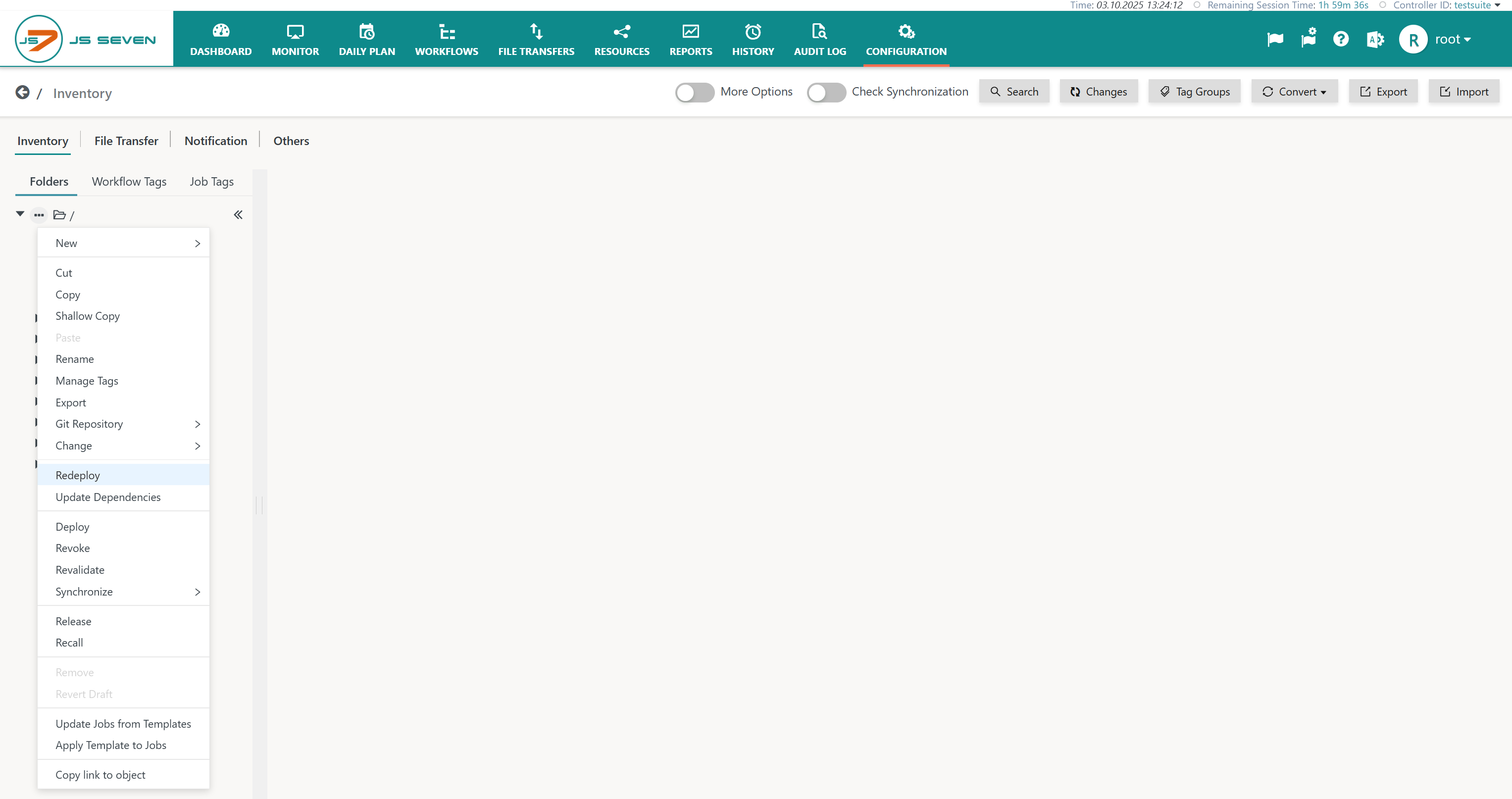
The operation is performed asynchronously and can take some time, possibly 1-2 minutes for an inventory of 1000 workflows. As a result the Workflows view and Configuration view will show an updated deployment date.
If more than one Controller is connected to JOC Cockpit, then users should switch Controller from the list box in the right upper corner of the GUI and should perform the redeploy operation for each Controller.
Updating the Daily Plan
After redeployment, users apply the following steps to update the Daily Plan:
- In the Daily Plan view activate the Submitted filter button.
- Per each future daily plan date select submitted orders using the related filter button and hit the Cancel button. In the calendar panel, holding the mouse key pressed and dragging across a number of days will select the days for cancellation of orders.
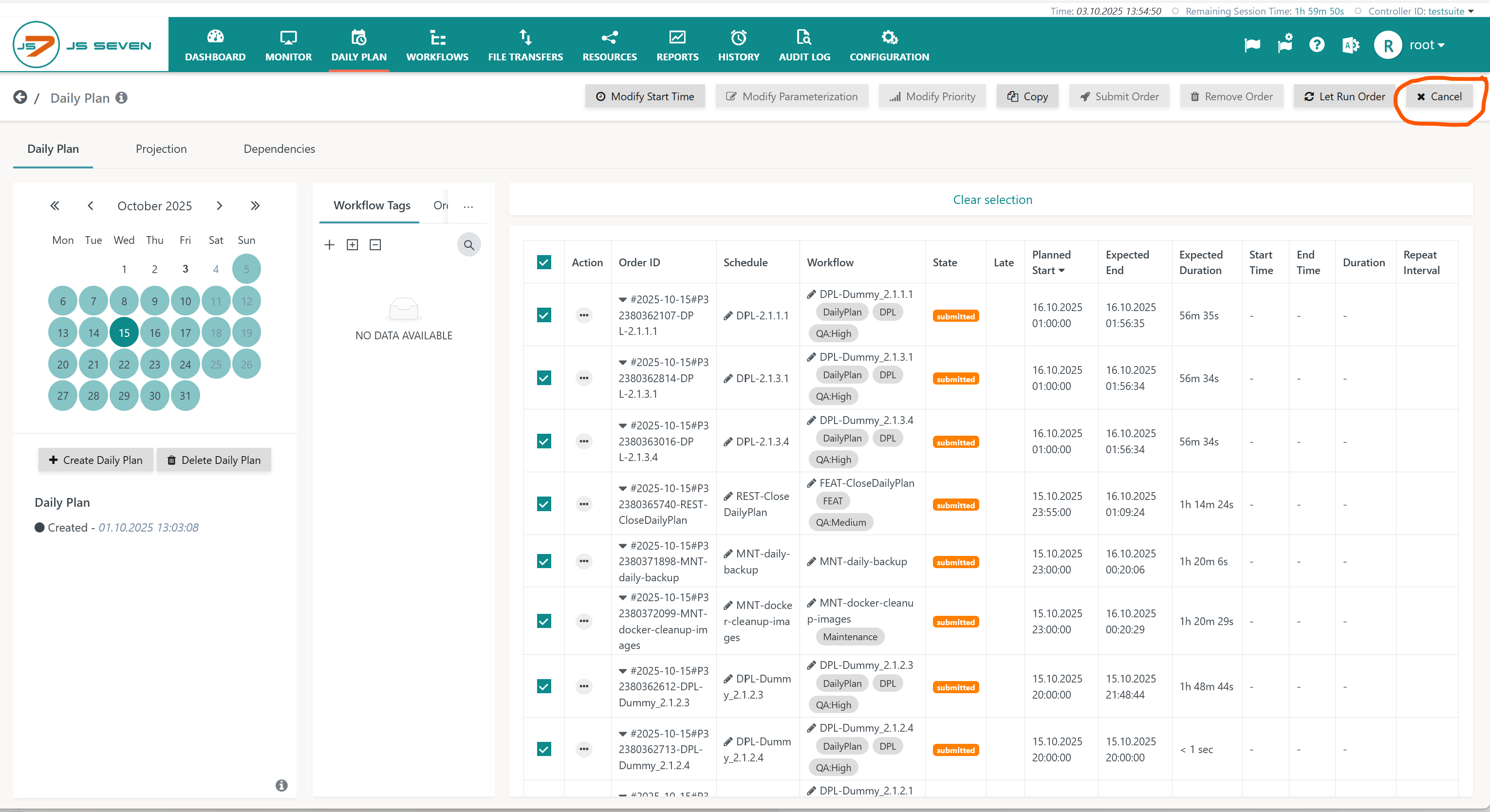
If more than one Controller is connected to JOC Cockpit, then users should switch Controller from the list box in the right upper corner of the GUI and should perform the cancel operation for each Controller.
Cancelled orders are recalled from the Controller and Agents. They will remain in the Daily Plan from the planned status. Users can choose one of the following options:
- Planned orders will be submitted automatically by the JS7 - Daily Plan Service. It is recommended that users force a Daily Plan run from the Dashboad view like this:
From the active JOC Cockpit's rectangle select the Run Service -> Daily Plan Service operation. Depending on the number of orders and days for which the Daily Plan will be calculated this can take 1-3 minutes.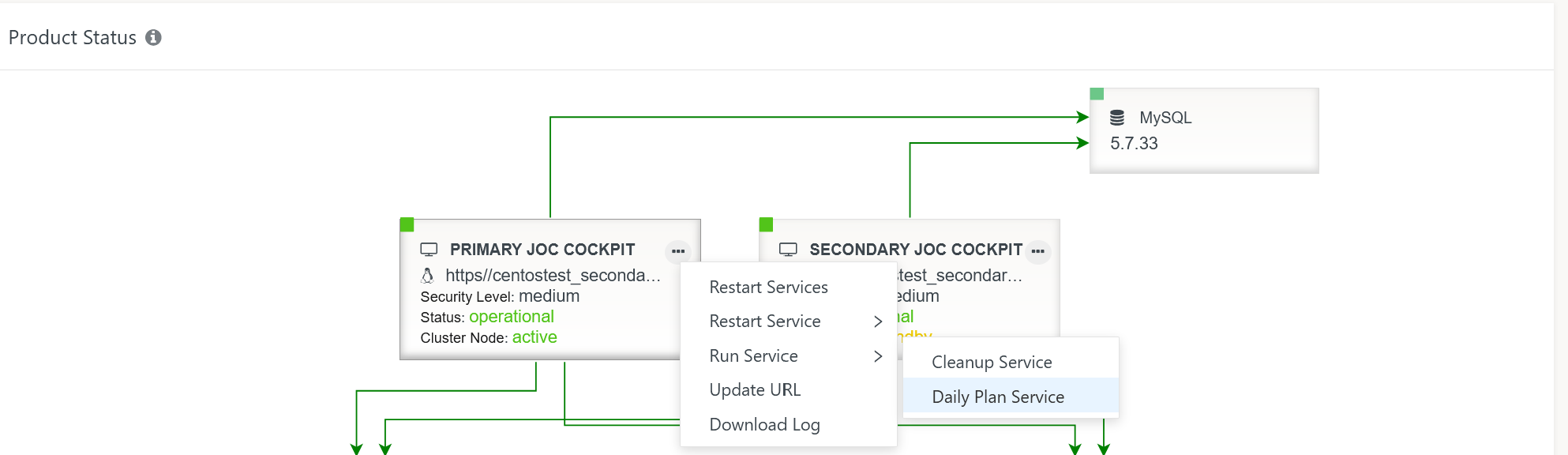
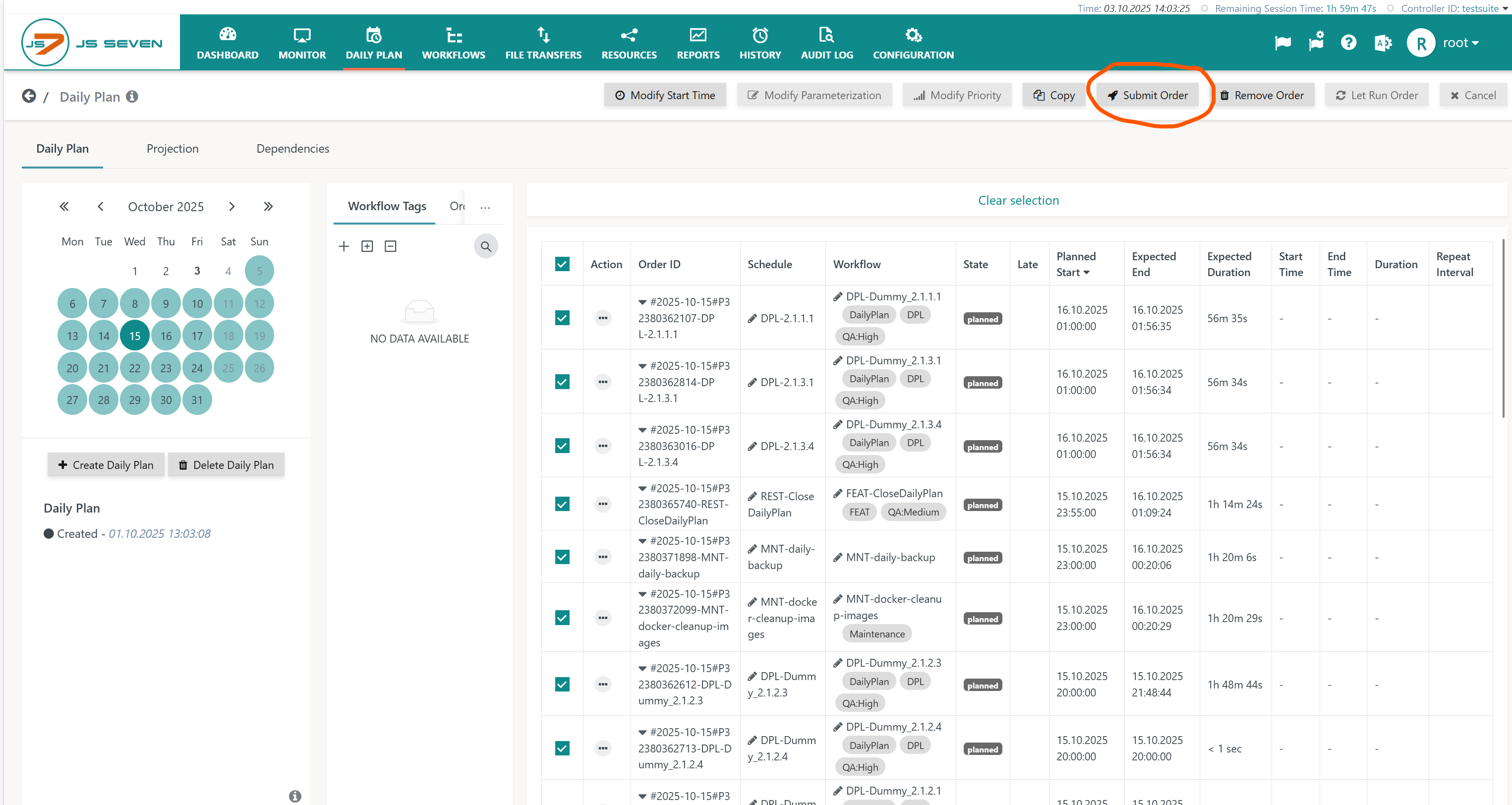
- Alternatively, users can submit orders from the Daily Plan view like this:
- Apply the planned filter button.
- Select all orders and hit the Submit button.
Frequently Asked Questions
When redeploying Workflows and Job Resources, then the deployment date will be updated. The date is visible
- from the Workflows view:
- In the tree panel move the mouse right to the root folder "/". A chevron down
 icon will be displayed. Hitting the icon will show all Workflows in the root folder and any sub-folders in the details panel.
 - In the details panel find the Deployment Date column header that allows sorting: repeatedly clicking the column header, offers ascending and descending sort order. This helps verifying that Workflows have been redeployed for the current date.
- Should the view show more than one version of the same Workflow, then either the Updating the Daily Plan step has not been performed, or you find orders from a previous date that did not complete the Workflow, for example due to a failed, suspended or waiting state.
- In the tree panel move the mouse right to the root folder "/". A chevron down
- from the Configuration->Inventory view:
- per Workflow or Job Resource.the Modification Date is displayed that corresponds to the Deployment Date if the object is in deployed status.
Overview
Content Tools