Introduction
Some users find the situation when they have to calculate a processing date for a job. Think of a reporting job that is used to process data for a previous period such as last week or last month.
- The functionality is avaiable from the JS7 - REST Web Service API that offers the /schedule/runtime endpoint.
The JS7 - JITL JS7RESTClientJob template implements a generic job to execute REST requests to JS7 REST Web Services.
Example
Uploading the Example
Users who wish to start from an example find the following files for upload to the JOC Cockpit inventory:
- Download (upload .json):
- Workflow: pdDynamicProcessingDate.workflow.json
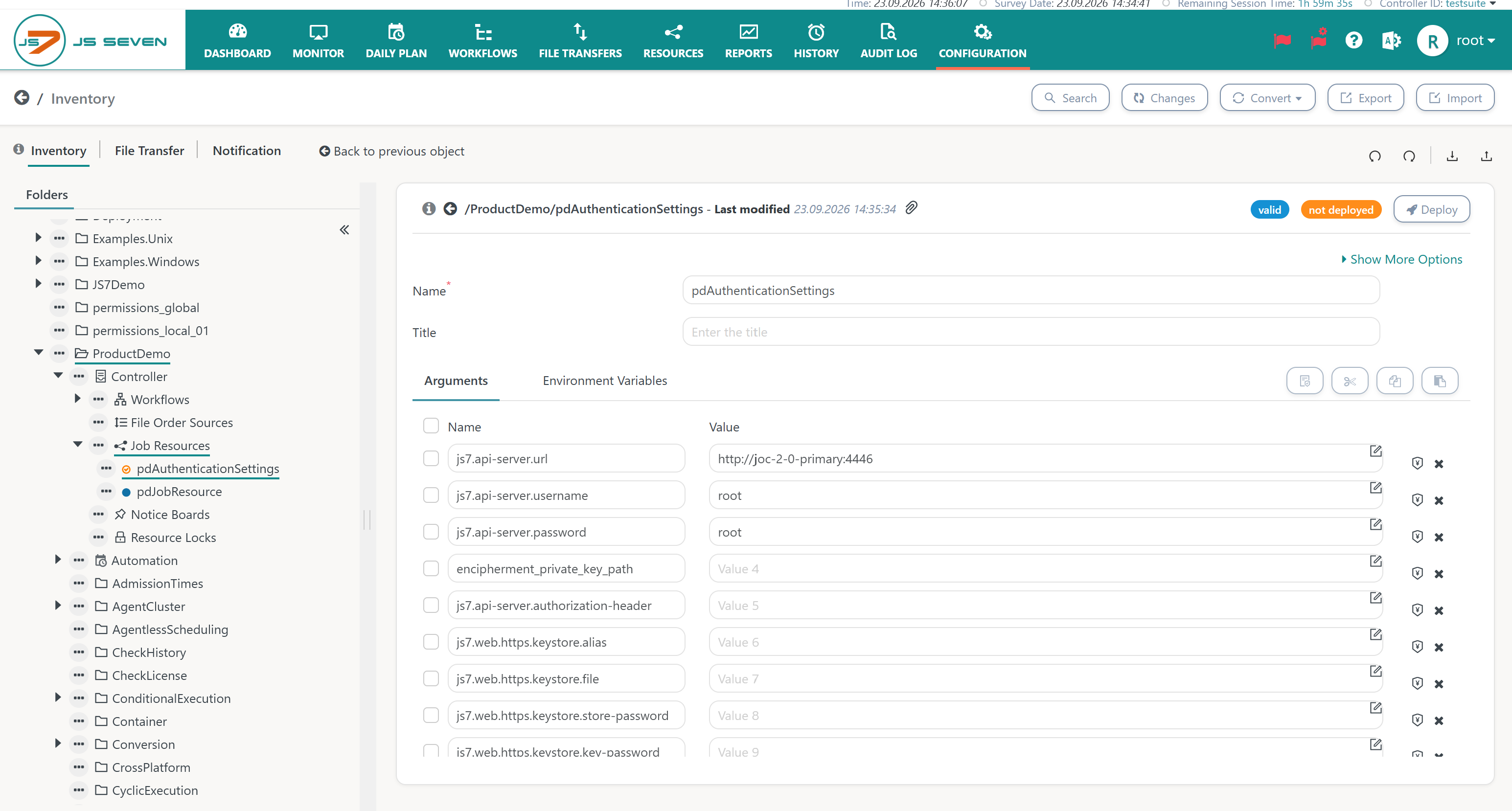
- Job Resource: pdAuthenticationSettings.jobresource.json
- Working Day Calendar: pdProcessingDates.workingdayscalendar.json
- Non Working Day Calendar: pdNoProcessingDates.nonworkingdayscalendar.json
As a result, the workflow: Job Resource and two calendars should be available with the JOC Cockpit inventorry.
Workflow: pdDynamicProcessingDate
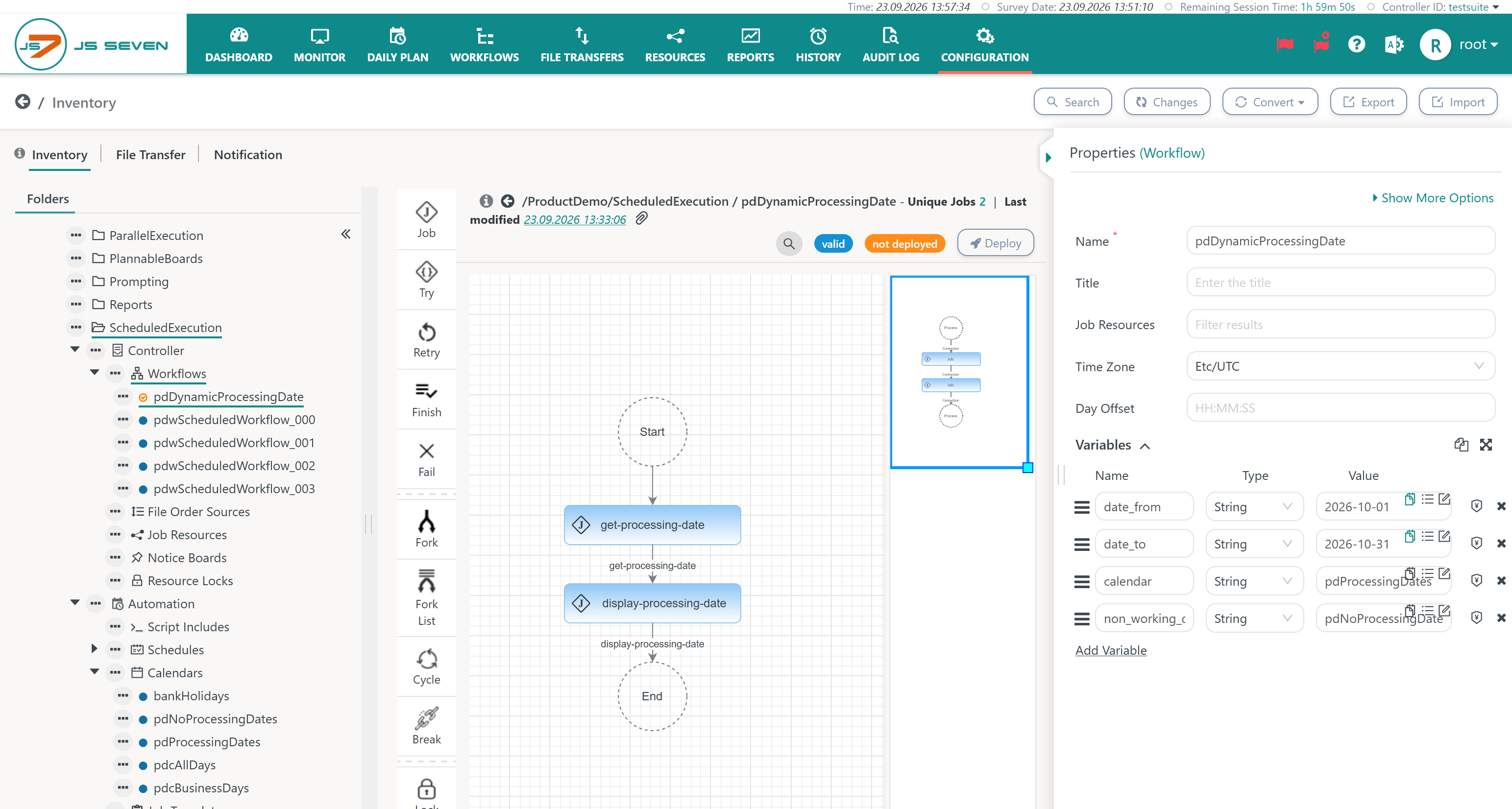
The workflow looks like this:
- The first job
get-processing-datewill execute the REST request for the /schedule/runtime endpoint and will return the next matching date. - The second job
get-processing-datawill simply display the processing data from a shell job. - The workflow holds four variables to parameterize the REST request:
date_from,date_to: specifies the period in which a next date is looked up.calendar: specifies the name of a Working Day Calendar.non_working_day_calendar: specifies the name of a Working Day Calendar.
First job: get-processing-date
The job configuration looks like this:
- The Job is assigned a Job Resource for authentication with the REST Web Service API, see Job Resource.
- The job makes use of the JS7 - JITL JS7RESTClientJob template.
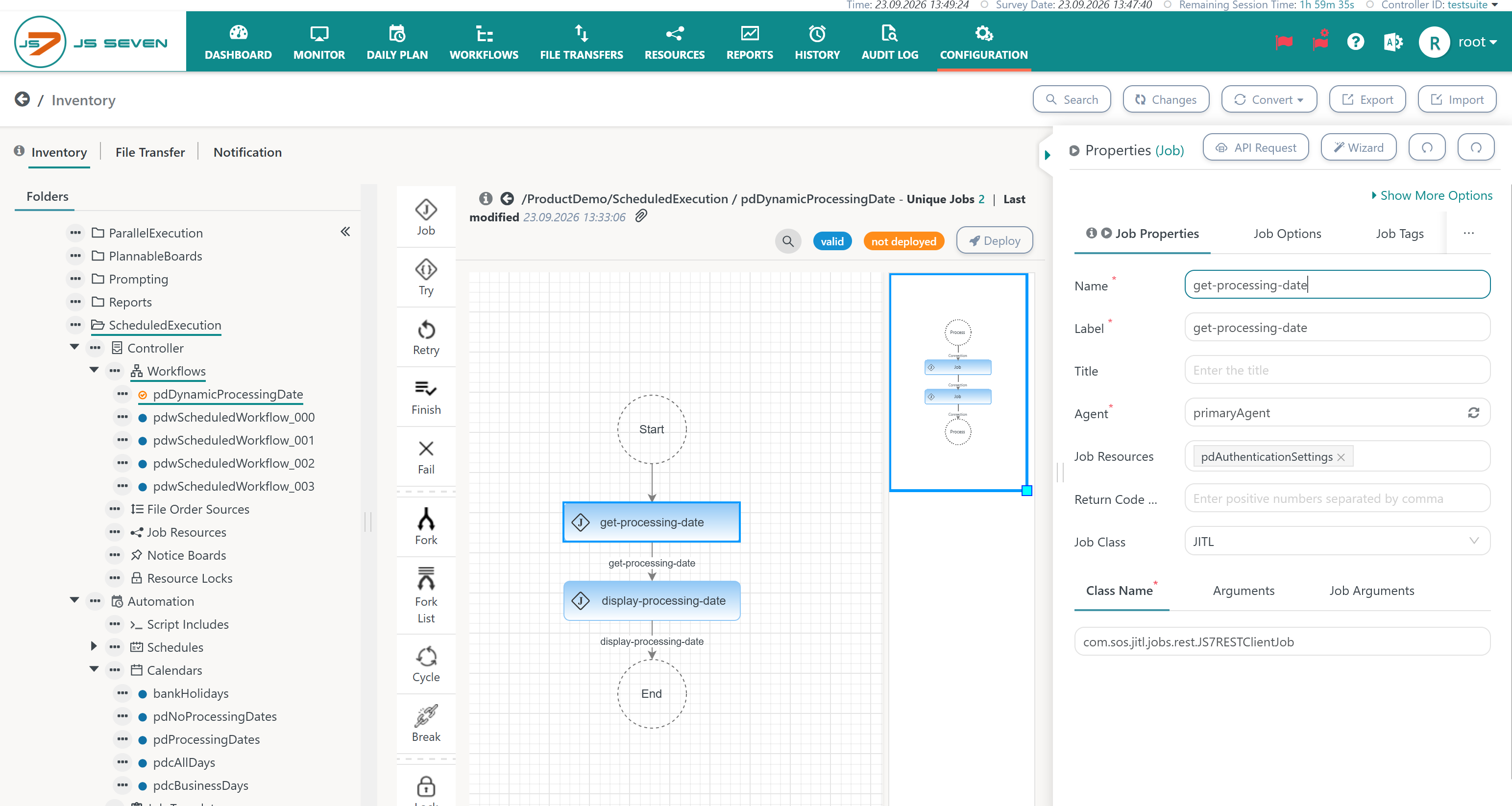
The following arguments are used by the job and are available from the Arguments tab.
request:holds the request body in JSON formatreturn_value:holds the processing instruction to extract the matching date from the response
Argument: request
The request argument looks like this:
- The /schedule/runtime endpoint is specified.
- The method is specified as POST.
- The body is parameterized from workflow variables
JSON document of request argument
{
    "endpoint": "/schedule/runtime",
    "method": "POST",
    "headers": [],
    "body": {
        "dateFrom": "${date_from}",
        "dateTo": "${date_to}",
        "calendars": [
            {
                "calendarName": "${calendar}",
                "periods": [
                    {
                        "singleStart": "00:00:00",
                        "whenHoliday": "NEXTNONWORKINGDAY"
                    }
                ]
            }
        ],
        "nonWorkingDayCalendars": [
            { "calendarName": "${non_working_day_calendar}" }
        ]
    }
}
Explanations:
- Workflow variables are used inside the JSON request and will be substituted at run-time.
- The request will look up the next date offered from the Working Day Calendar. This includes that the Non Working Day Calendar is considered that includes certain dates.
- In this example
- the
pdProcessingDatesWorking Day Calendar gives us the first 3 days of each month, - the
pdNoProcessingDatesNon Working Day Calendar excludes the first day of month. - the
whenHolidayproperty holds the NEXTNONWORKINGDAY value which looks up the next date not matched by a non working day. Other possible values include:- PREVIOUSNONWORKINGDAY: will return the previous working day if the first day in the period is a non working day.
- SUPPRESS: will not return a date if a non working day is met.
- IGNORE: will return the first date of the period even if it is a non working day.
- As a result, the 2nd day of month within the period specified by
date_fromanddate_towill be returned
- the
Argument: return_variable
The return_variable argument extracts values from the REST response and maps them to dynamic workflow variables.
The REST response holds an array of dates that can look like this:
JSON document of REST response
{
  "deliveryDate": "2026-09-23T10:32:03.496+00:00",
  "dates": {
    "2026-10-01": {
      "periods": [
        {
          "singleStart": "2026-10-01T00:00:00Z"
        }
      ]
    },
    "2026-10-02": {
      "periods": [
        {
          "singleStart": "2026-10-02T00:00:00Z"
        }
      ]
    }
  }
}
The mapping of REST response and return variables works like this:
- The
processing_dateworkflow variable is added. - The REST response holds an array of dates from which the first date will be assigned the
processing_datevariable..
JSON document of return_variable argument
[
  {
    "name": "processing_date",
    "path": ".dates | keys_unsorted[0] || --raw-output"
  }
]
Second job: display-processing-date
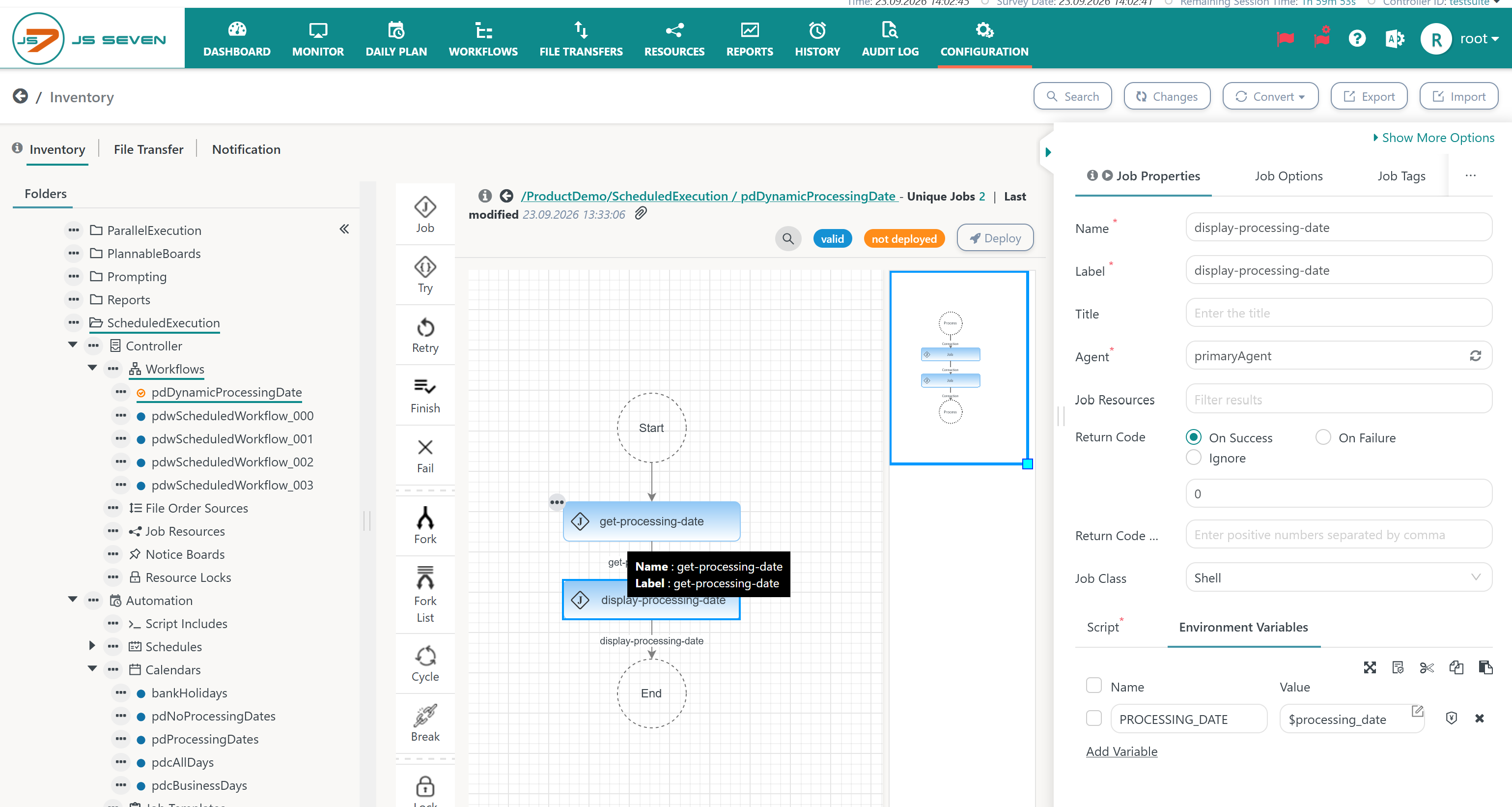
This is a shell job that displays the value of the processing_date dynamic workflow variable that is returned by the first job.
In the Environment Variables tab the PROCESSING_DATE environment variable is created from the value of the processing_date workflow variable.
The shell job script is available from .the Script tab and looks like this: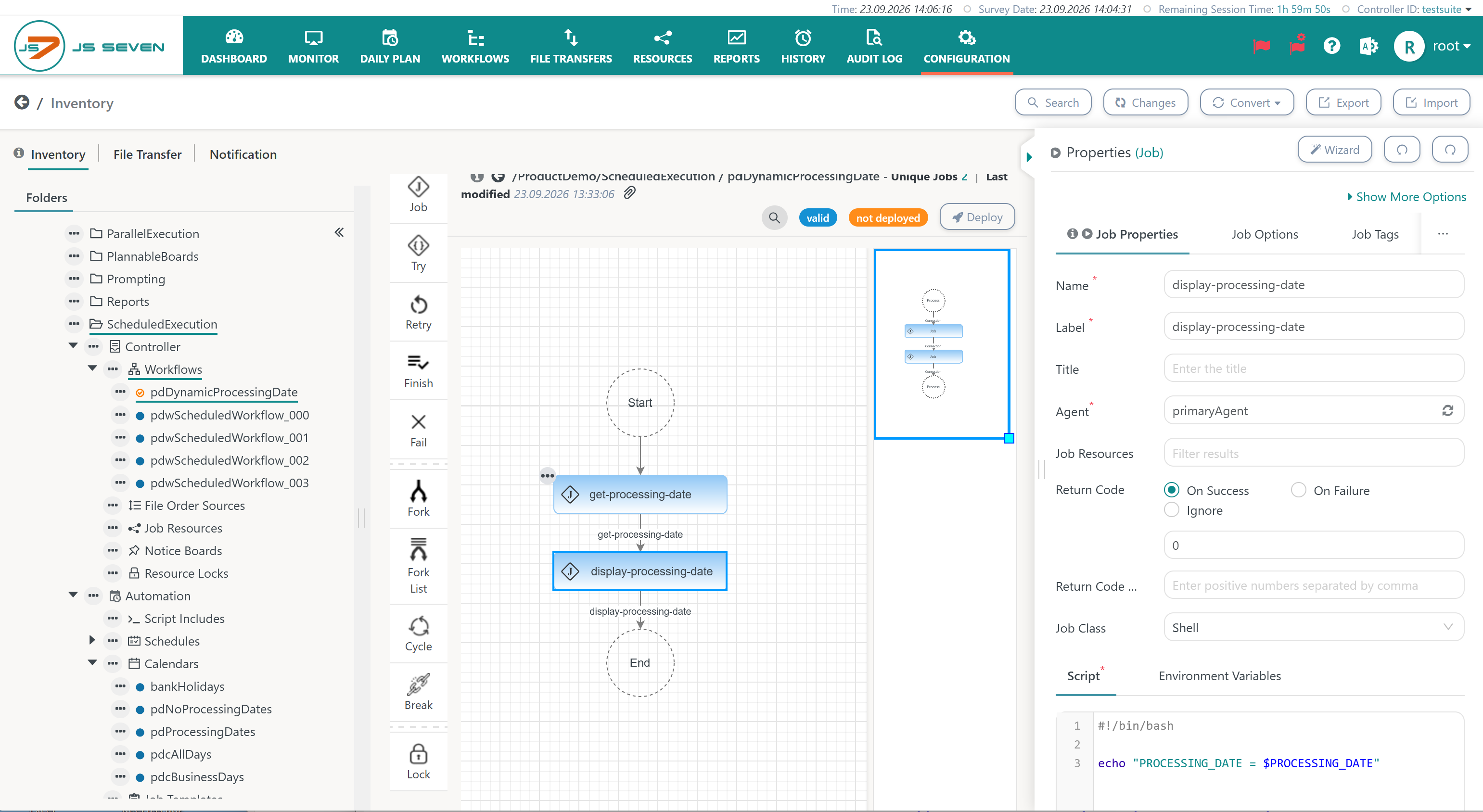
Job Resource: pdAuthenticationSettings
The Job Resource is used to authenticate with JOC Cockpit. For details see JS7 - JITL Common Authentication.
- The example is quite basic and makes use of HTTP with user/password authentication.
- More elaboate authentication mechanisms such as JS7 - Certificate based Authentication and JS7 - OIDC Identity Service are supported.
Further Resources
- JS7 - JITL Common Authentication
- JS7 - JITL Common Variables
- JS7 - JITL JS7RESTClientJob
- JS7 - JITL jq Interface
Overview
Content Tools