Introduction
Integration of requests to LLM services into a workflow is preferably performed from the REST API offered by the LLM service.
- REST API of a publicly available LLM service,
- REST API of an LLM service set up in the user's local environment.
JS7 offers the JS7 - JITL RESTClientJob template that ships with JS7 Agents and that can be used to execute REST requests.
Example
The example implements a workflow with the following steps:
- Ask an LLM a question that returns a city, for example, the most sunny city in Europe.
- Identify coordinates of the resulting city from some geolocation web service.
- Ask a weather data service for current temperatures in the resulting city.
- Ask the LLM to create a JSON document that holds the city and temperature.
Workflow
Download (upload from .json): pdAskCity-GetWeather.workflow.json
After upload, the workflow should look like this in JOC Cockpit's Configuration view:
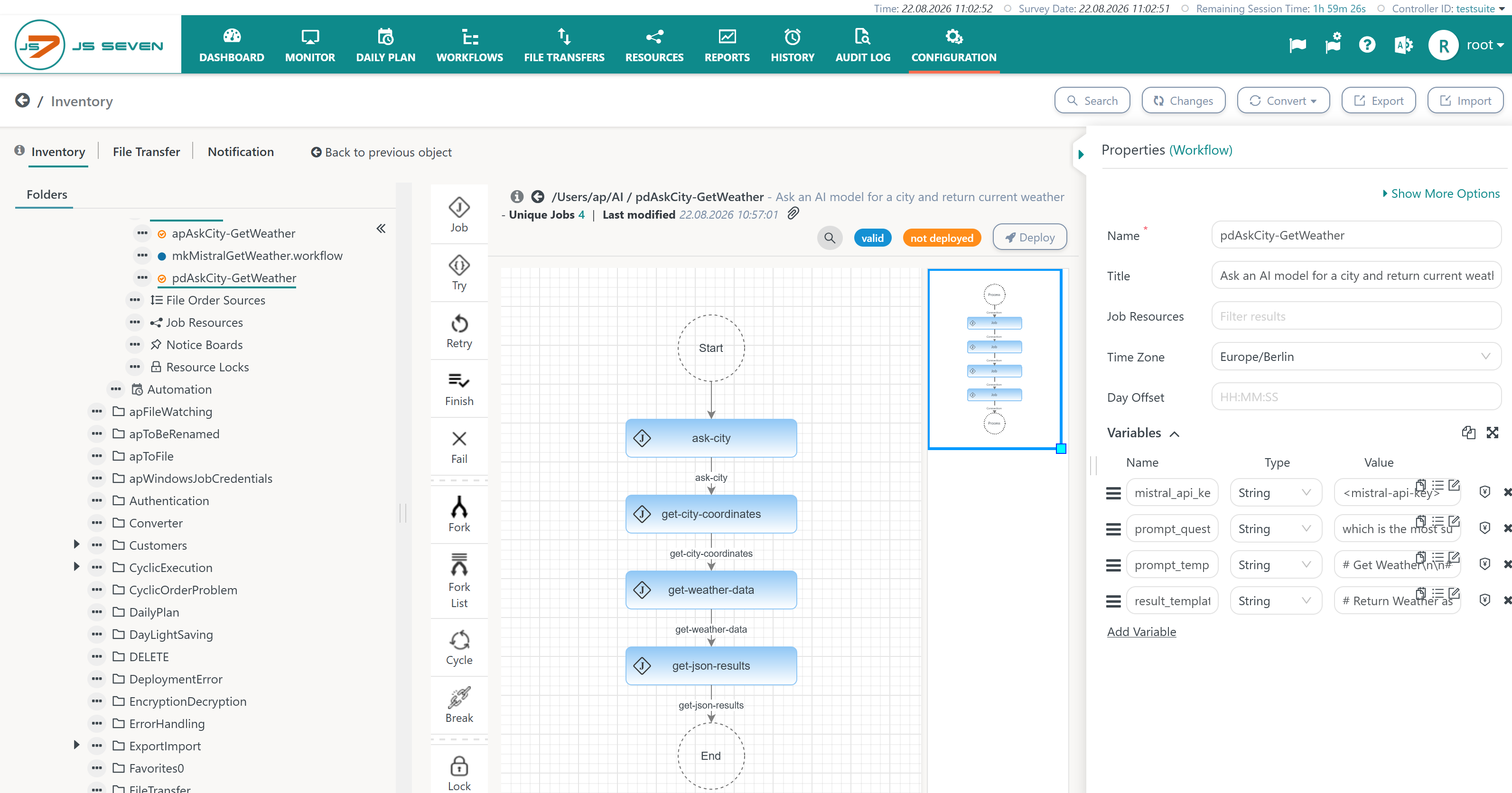
Explanations:
- The workflow is parameterized from the following variables:
mistral_api_key: holds the API Key for access to the Mistral LLM service. API Keys can be requested from the vendor of the LLM service.prompt_question: holds the question asked by the user, for example, which is the most sunny city?prompt_template: instructs the LLM about the scope of the question and the response (to return the name of a city).result_template: specifies the JSON format in which the result (name of a city) is expected.
- Variables can be set at workflow level and can be specified when adding an order.
Order
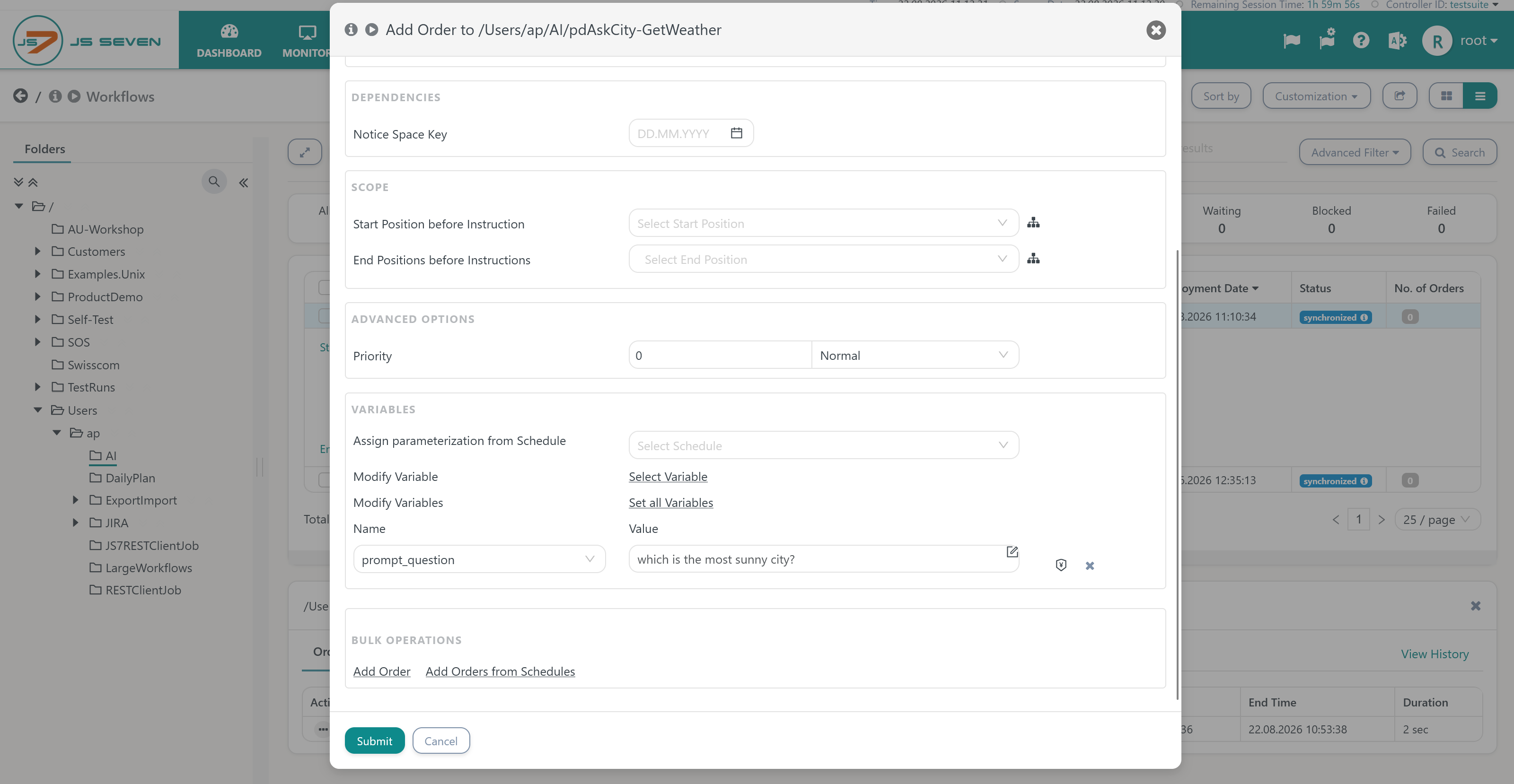
When deploying ther workflow and adding an order from the Workflows view, users can modfy above workflow variables like this:
Jobs
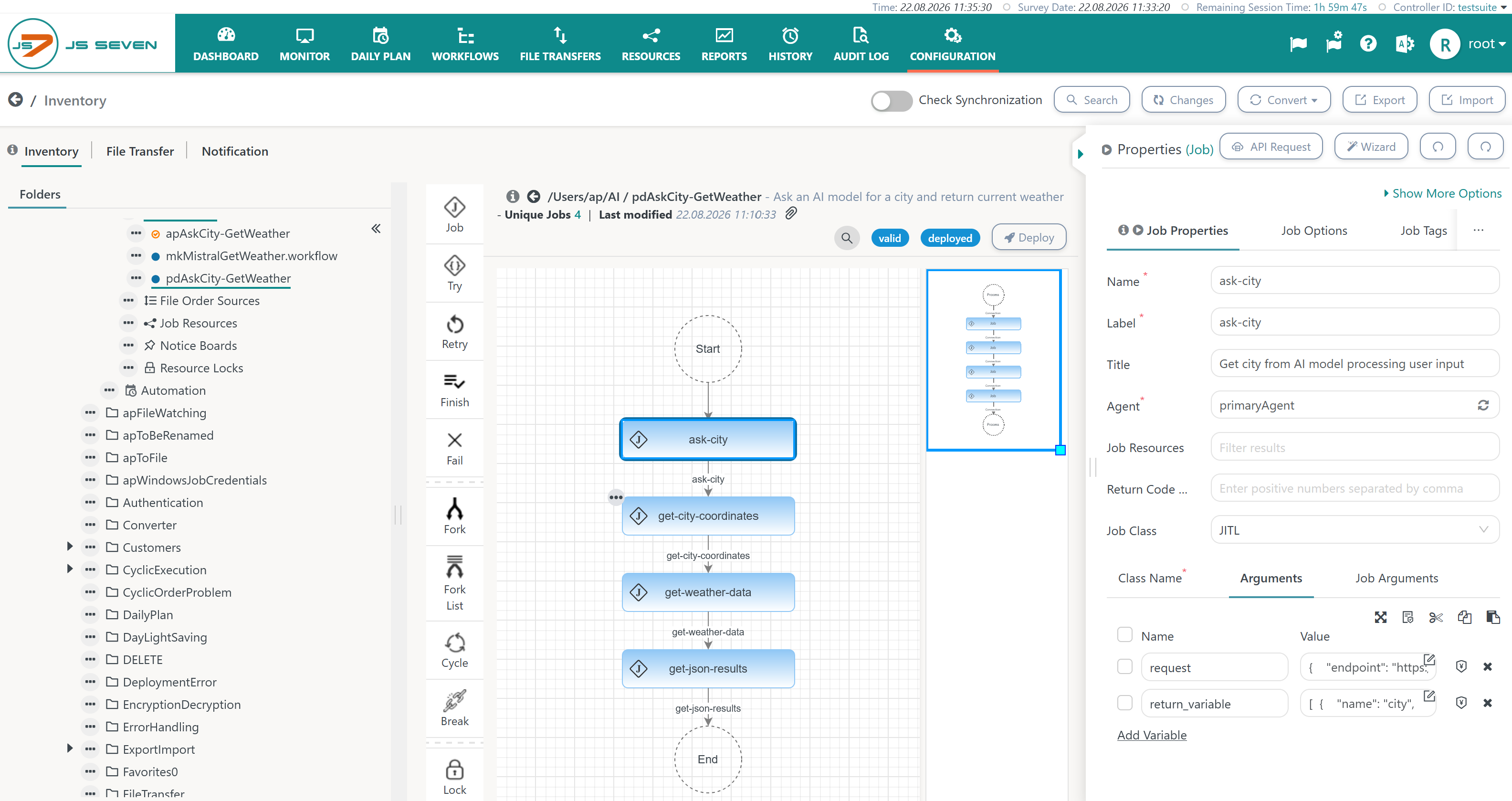
All jobs in the workflow are using the JS7 - JITL RESTClientJob template. The job template ships with JS7 Agents and implements a request to a web serivce that is parameterized from the following arguments.
- Clicking the (blue) job in the middle panel shows the Job Properties in the right panel.
- Switching to the Arguments tab, gives the list of available arguments.
First Job: ask-city
The job asks an LLM a question that returns the name of a city.
Argument: request
The argument holds the request in JSON format that looks like this for the ask-city job.
Example for request to an LLM web service
{
    "endpoint": "https://api.mistral.ai/v1/conversations",
    "method": "POST",
    "headers": [
        {
            "key": "Content-Type",
            "value": "application/json"
        },
        {
            "key": "Authorization",
            "value": "Bearer ${mistral_api_key}"
        }
    ],
    "body": {
        "model": "mistral-small-latest",
        "instructions": "",
        "inputs": [{
            "role": "user",
            "content": "${prompt_template} ${prompt_question}"
        }],
        "tools": [],
        "completion_args": {
            "temperature": 0.7,
            "max_tokens": 2048,
            "top_p": 1
        }
    }
}
Explanations:
- Line 2: The URL of the LLMs REST Web Service is specified. This could be the URL of a local service or of a service available from the LLM's vendor.
- Lines 10, 11: Authentication frequently includes an
Authorizationheader with a bearer token which is assigned the API Key. The key is provided from the$mistral_api_keyvariable configured at workflow level. - Lines 14 to 27: The body of the request is specific for the LLM's REST API. For the Mistral model in question, the
$prompt_templateand$prompt_questionworkflow variables are specified. - Line 22 to 26: The
completion_argselement holds directives specific to the LLM.
Argument: return_variables
The argument specifies dynamic variables that are created from the LLM's response:
Example of return variables for an LLM web service response
[
  {
    "name": "city",
    "path": ".outputs[0].content | @uri || --raw-output"
  }
]
Explanations:
- Return Variables are specified from a JSON array of objects.
- Each element holds a
nameand apath.- A workflow variable with the name
citywill be created that can be used in subsequent jobs. - The variable's value is specified from a path to the LLM's JSON response. The Mistral model in question returns an
outputsarray with acontentproperty.- The expression for the
pathmakes use of jq. For details see JS7 - JITL jq Interface. - The resulting city will be url-encoded (@uri) and will be stripped from quotes (--raw-output).
- The expression for the
- A workflow variable with the name
Second Job: get-city-coordinates
The job identifies the geolocation of the city in question.
Argument: request
The argument holds the request in JSON format to a public geolocation service that looks like this for the get-city-coordinates job:
Example for request to a geolocation web service
{
    "endpoint": "https://geocoding-api.open-meteo.com/v1/search?count=1&name=${city}",
    "method": "GET",
    "headers": [
        {
            "key": "Content-Type",
            "value": "application/json"
        }
    ],
    "body": {}
}
Explanations:
- Line 2: The URL of the geolocation REST Web Service is specified. Consider the
$cityvariable used as a query parameter in the URL.
Argument: return_variables
The argument specifies dynamic variables that are created from the geolocation web service response:
Example of return variables for a geolocation web service response
[
  {
    "name": "latitude",
    "path": ".results[0].latitude || --raw-output"
  },
  {
    "name": "longitude",
    "path": ".results[0].longitude || --raw-output"
  }
]
Explanations:
- The
latitudeandlongitudedynamic variables are created for use by subsequent jobs. Variables are specified from theirnameandpath. - The jq expression for the
pathextracts the related attribute values from theresultsarray of the web service response.
Third Job: get-weather-data
The job returns weather data for the location of the city in question.
Argument: request
The argument holds the request in JSON format to a public weather data service that looks like this for the get-weather-data job:
Example for request to a weather data web service
{
"endpoint": "https://api.open-meteo.com/v1/forecast?latitude=${latitude}&longitude=${longitude}¤t=temperature_2m",
"method": "GET",
"headers": [
{
"key": "Content-Type",
"value": "application/json"
}
],
"body": {}
}
Explanations:
- Line 2: The URL of the weather data REST Web Service is specified. Consider use of the
$latitudeand$longitudedynamic variables as query parameters in the URL.
Argument: return_variables
The argument specifies dynamic variables that are created from the weather data web service response:
Example of return variables for a weather data web service response
[
  {
    "name": "weather_data",
    "path": ".current.temperature_2m || --raw-output"
  }
]
Explanations:
- The
weather_datadynamic variable is created for use by subsequent jobs. Variables are specified from theirnameandpath. - The variable's value is extracted from the weather data web service response by a jq query.
Fourth Job: get-json-results
The job is not a necessary part of a workflow. It is presented to showcase that LLMs can be used to format JSON input to a desired output format. There are a number of ways how to achieve this.
Argument: request
The argument holds the request in JSON format to the LLM web service that looks like this for the get-json-results job:
Example for request to an LLM web service to format JSON output
{
    "endpoint": "https://api.mistral.ai/v1/conversations",
    "method": "POST",
    "headers": [
        {
            "key": "Content-Type",
            "value": "application/json"
        },
        {
            "key": "Authorization",
            "value": "Bearer ${mistral_api_key}"
        }
    ],
    "body": {
        "model": "mistral-small-latest",
        "instructions": "",
        "inputs": [{
            "role": "user",
            "content": "${result_template}\ncity: ${city}\n${weather_data}"
        }],
        "tools": [],
        "completion_args": {
            "temperature": 0.7,
            "max_tokens": 2048,
            "top_p": 1
        }
    }
}
Explanations:
- Line 2: The URL of the LLM's REST Web Service is specified.
- Line 10, 11: Similarly to the first job, authentication is specified.
- Lines 14 to 27: The body of the request is specific for the LLM's REST API. For the Mistral model in question, the
$result_templateworkflow variable and the$weather_datadynamic variable are specified. - Line 22 to 26: The
completion_argselement holds directives specific to the LLM.
Argument: return_variables
The argument specifies dynamic variables that are created from the LLM's web service response:
Example of return variables for an LLM web service response
[
  {
    "name": "results",
    "path": ".outputs[0].content || --raw-output"
  }
]
Explanations:
- The
resultsvariable is created for use by subsequent jobs. Variables are specified from theirnameandpath. - The variable's value is extracted from the LLM's web service response by a jq query. The value of the
resultsvariable could look like this:{"location": "Paris", "temperature": "18 C"}
Resources
Overview
Content Tools